> ## Documentation Index
> Fetch the complete documentation index at: https://docs.chatzy.ai/llms.txt
> Use this file to discover all available pages before exploring further.
# Data
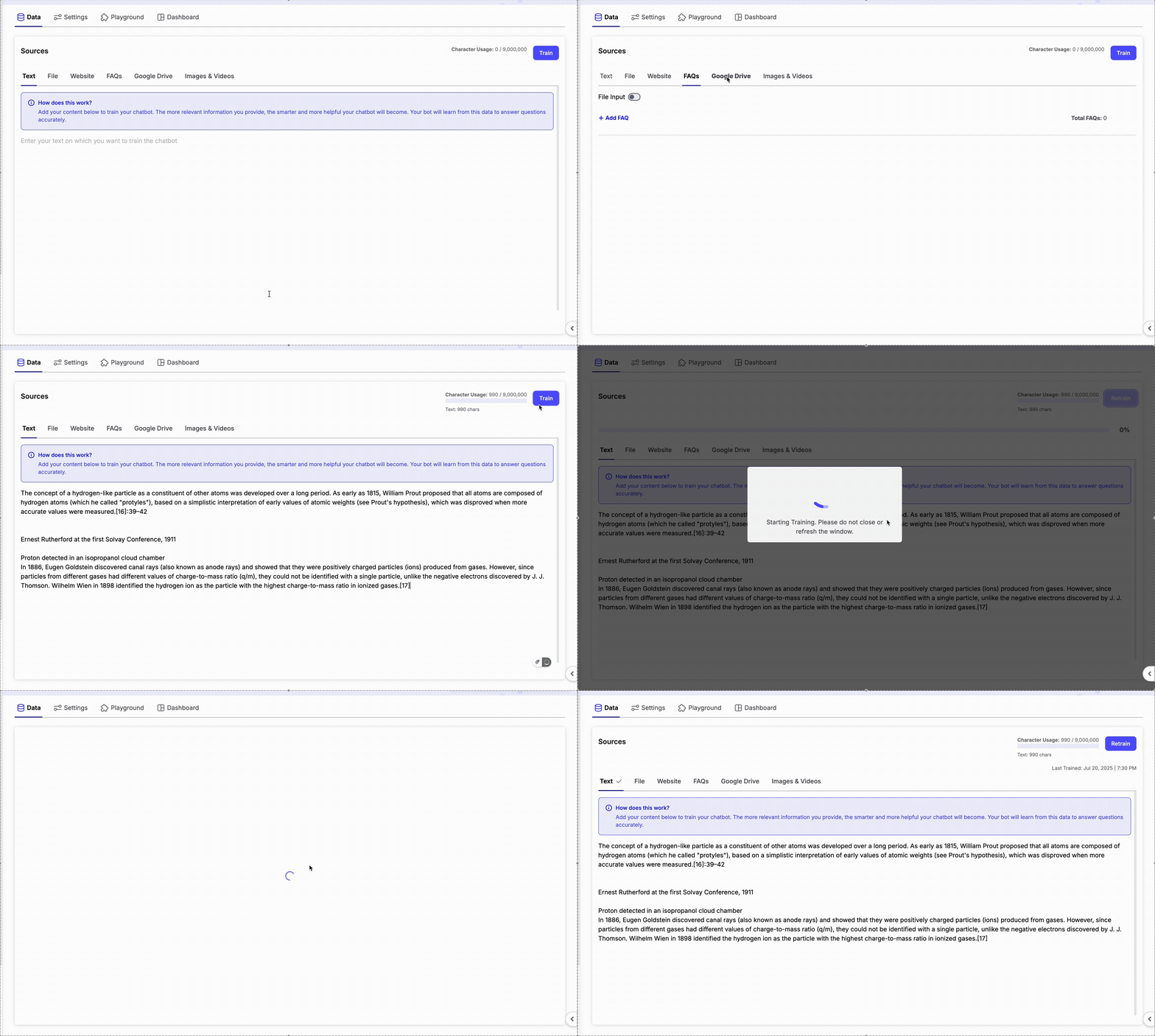 Your bot learns from various data sources. The more relevant the data, the better your agent performs.
## **Supported Data Types**
* **Text:** Paste plain text directly into the platform.
* **Files:** Upload documents such as `.pdf`, `.docx`, `.txt`, and `.csv`.
* **Website URLs:** Add a URL and let Chatzy extract useful content.
* **FAQs:** Manually input question-answer pairs for precise responses.
* **Google Drive:** Link a public folder with view-only access.
* **Media:** Upload images, videos, and PDF documents to enrich your AI agent's knowledge.
***
### Website Data Options
When adding **Website URLs** as a data source, Chatzy provides multiple ways to fetch content:
* **Crawl**\
Automatically scans all pages linked from the given URL (excluding file downloads).\
Example: entering `https://example.com` will crawl all linked pages under that domain.
* **Sitemap**\
Provide an XML sitemap URL to fetch structured content from your website.
* **Link**\
Add a single webpage URL to pull specific content.
* **CSV File**\
Upload a CSV containing multiple URLs for bulk website training.
***
### Apify Crawler (Optional)
You can enable **Use Apify Crawler** for more advanced and accurate website crawling.
* Consumes **2 credits per webpage crawled**.
* Extracts cleaner, structured content optimized for LLM training.
* Recommended for large or dynamic websites.
Learn more: [Apify Website Content Crawler](https://apify.com/apify/website-content-crawler)
***
> The Website tab gives you the flexibility to crawl entire websites, import sitemaps, train from individual pages, or bulk import URLs using CSV files.
***
### FAQ CSV Import
You can bulk import FAQs using a **CSV file**.
* The **first column** is treated as the **Question**.
* The **second column** is treated as the **Answer**.
* The CSV **must not contain headers**.
This is the fastest way to upload a large FAQ database.
***
### Google Drive Import
Train your AI Agent directly from documents stored in Google Drive.
* Enter the **view-only link** of a Google Drive folder.
* The folder may contain **Google Docs** and **Google Sheets**.
* Ensure the folder is publicly accessible with **Viewer** permission.
All supported files inside the folder will be processed automatically.
***
### Media
You can upload media files to provide additional visual and document context to your AI agent.
#### Supported Files
* **Images:** PNG and JPEG (Maximum **5 MB** per file)
* **Videos:** MP4 (Maximum **16 MB** per file)
* **Documents:** PDF (Maximum **25 MB** per file)
#### Upload Guidelines
* Each uploaded file requires a **description** (maximum **25 words**).
* Maximum **30 media files** can be uploaded.
* Files can be uploaded using drag-and-drop or the file picker.
* Enable **Add Directly to Prompt** if you want media links and descriptions to be included directly in the AI Agent's Base Prompt.
***
## Training Your Data
After adding or updating your knowledge sources:
1. Click **Train** in the top-right corner.
2. Wait for the training process to complete.
3. Once training finishes, your AI agent will immediately begin using the latest knowledge during conversations.
### Auto Data Train
If your knowledge sources are updated frequently, you can enable **Auto Data Train** to retrain your agent automatically without manual intervention.
Available options:
* **Off** – Manual training only.
* **Daily** – Retrains every day.
* **Weekly** – Retrains once every week.
* **Fortnightly** – Retrains once every two weeks.
* **Monthly** – Retrains once every month.
This is especially useful for websites or Google Drive folders whose content changes regularly.
***
### Source Type Summary
| Source Type | Supported Formats |
| ------------ | ---------------------------------- |
| Text | Manual text input |
| File Upload | PDF, DOCX, TXT, CSV |
| Website | Crawl, Sitemap, Link, CSV URLs |
| FAQ | Manual Q\&A or CSV Import |
| Google Drive | Public Google Docs & Sheets |
| Media | PNG, JPEG, MP4, PDF (30 files max) |
Your bot learns from various data sources. The more relevant the data, the better your agent performs.
## **Supported Data Types**
* **Text:** Paste plain text directly into the platform.
* **Files:** Upload documents such as `.pdf`, `.docx`, `.txt`, and `.csv`.
* **Website URLs:** Add a URL and let Chatzy extract useful content.
* **FAQs:** Manually input question-answer pairs for precise responses.
* **Google Drive:** Link a public folder with view-only access.
* **Media:** Upload images, videos, and PDF documents to enrich your AI agent's knowledge.
***
### Website Data Options
When adding **Website URLs** as a data source, Chatzy provides multiple ways to fetch content:
* **Crawl**\
Automatically scans all pages linked from the given URL (excluding file downloads).\
Example: entering `https://example.com` will crawl all linked pages under that domain.
* **Sitemap**\
Provide an XML sitemap URL to fetch structured content from your website.
* **Link**\
Add a single webpage URL to pull specific content.
* **CSV File**\
Upload a CSV containing multiple URLs for bulk website training.
***
### Apify Crawler (Optional)
You can enable **Use Apify Crawler** for more advanced and accurate website crawling.
* Consumes **2 credits per webpage crawled**.
* Extracts cleaner, structured content optimized for LLM training.
* Recommended for large or dynamic websites.
Learn more: [Apify Website Content Crawler](https://apify.com/apify/website-content-crawler)
***
> The Website tab gives you the flexibility to crawl entire websites, import sitemaps, train from individual pages, or bulk import URLs using CSV files.
***
### FAQ CSV Import
You can bulk import FAQs using a **CSV file**.
* The **first column** is treated as the **Question**.
* The **second column** is treated as the **Answer**.
* The CSV **must not contain headers**.
This is the fastest way to upload a large FAQ database.
***
### Google Drive Import
Train your AI Agent directly from documents stored in Google Drive.
* Enter the **view-only link** of a Google Drive folder.
* The folder may contain **Google Docs** and **Google Sheets**.
* Ensure the folder is publicly accessible with **Viewer** permission.
All supported files inside the folder will be processed automatically.
***
### Media
You can upload media files to provide additional visual and document context to your AI agent.
#### Supported Files
* **Images:** PNG and JPEG (Maximum **5 MB** per file)
* **Videos:** MP4 (Maximum **16 MB** per file)
* **Documents:** PDF (Maximum **25 MB** per file)
#### Upload Guidelines
* Each uploaded file requires a **description** (maximum **25 words**).
* Maximum **30 media files** can be uploaded.
* Files can be uploaded using drag-and-drop or the file picker.
* Enable **Add Directly to Prompt** if you want media links and descriptions to be included directly in the AI Agent's Base Prompt.
***
## Training Your Data
After adding or updating your knowledge sources:
1. Click **Train** in the top-right corner.
2. Wait for the training process to complete.
3. Once training finishes, your AI agent will immediately begin using the latest knowledge during conversations.
### Auto Data Train
If your knowledge sources are updated frequently, you can enable **Auto Data Train** to retrain your agent automatically without manual intervention.
Available options:
* **Off** – Manual training only.
* **Daily** – Retrains every day.
* **Weekly** – Retrains once every week.
* **Fortnightly** – Retrains once every two weeks.
* **Monthly** – Retrains once every month.
This is especially useful for websites or Google Drive folders whose content changes regularly.
***
### Source Type Summary
| Source Type | Supported Formats |
| ------------ | ---------------------------------- |
| Text | Manual text input |
| File Upload | PDF, DOCX, TXT, CSV |
| Website | Crawl, Sitemap, Link, CSV URLs |
| FAQ | Manual Q\&A or CSV Import |
| Google Drive | Public Google Docs & Sheets |
| Media | PNG, JPEG, MP4, PDF (30 files max) |