> ## Documentation Index
> Fetch the complete documentation index at: https://docs.chatzy.ai/llms.txt
> Use this file to discover all available pages before exploring further.
# Chat widget
### The Chat Widget Tab
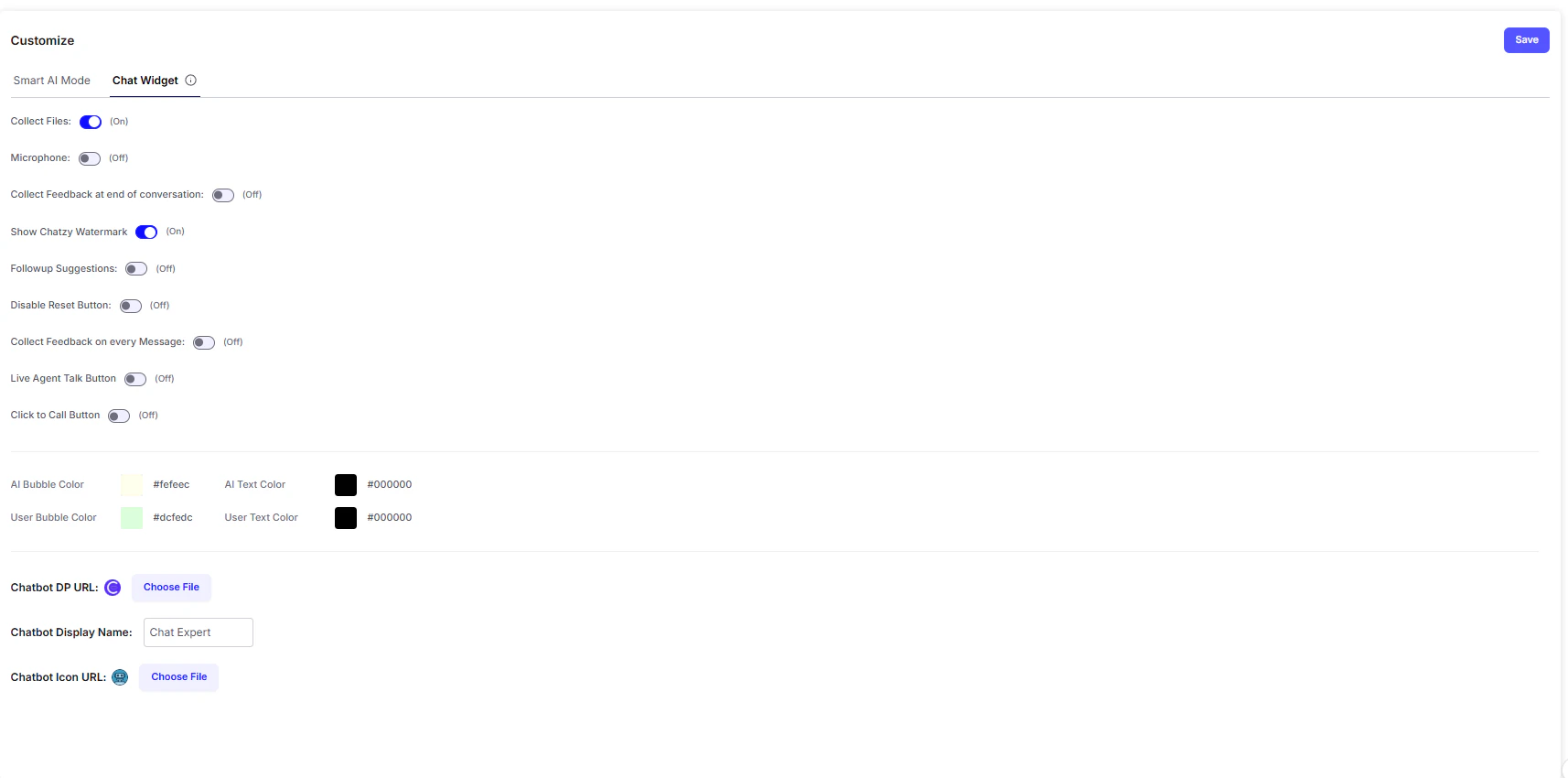
The **Chat Widget** tab allows you to customize the look, feel, and functionality of your chatbot when it is embedded on your website. Proper customization ensures a smooth and on-brand chat experience for your users.
 ***
#### Key Features
* **Collect Files**\
Enables users to upload files (images, PDFs, documents) directly into the chat. Useful for cases like resume uploads, ID proof submissions, or support screenshots.
* **Microphone**\
Adds a microphone button so users can send **voice messages** instead of typing, improving accessibility and convenience.
* **Collect Feedback at End of Conversation**\
Prompts users to rate or provide feedback at the close of a session, helping you measure satisfaction and improve chatbot performance.
* **Show Chatzy Watermark**\
Displays a small **“Powered by Chatzy”** watermark at the bottom of the widget.
* **Follow-up Suggestions**\
Automatically provides suggested questions or prompts after each chatbot response, keeping the conversation engaging and guiding users forward.
* **Disable Reset Button**\
Removes the option for users to clear conversation history, ensuring the full context of the session is preserved.
* **Collect Feedback on Every Message**\
Adds a per-message rating system, allowing users to give real-time feedback on the chatbot’s answers.
* **Live Agent Talk Button**\
Adds a one-click option to escalate the chat to a **human agent**, ensuring smooth handoffs for complex queries.
* **Click to Call Button**\
Lets users instantly initiate a phone call from the chat widget especially useful for support or sales teams.
***
#### Branding & Design Options
* **Color Customization**\
Tailor the widget’s colors to match your brand identity:
* **AI Bubble Color** → Background color of chatbot’s replies
* **AI Text Color** → Text color in chatbot replies
* **User Bubble Color** → Background color of user messages
* **User Text Color** → Text color in user messages
* **Chatbot DP URL & Chatbot Icon URL**
* **DP (Display Picture)**: The main profile image of your chatbot (visible inside the chat).
* **Icon**: The small floating image/button that appears on your website to open the chat widget.
***
#### Example Use Case
Imagine you’re running a **real estate website**:
* A visitor starts chatting with the bot to check property listings.
* They use the **Microphone button** to send a voice query: *“Show me 2BHK apartments in Pune under ₹50 lakhs.”*
* The chatbot responds with results and provides **Follow-up Suggestions** like:\
*“Do you want to book a site visit?”* or *“Would you like financing options?”*
* The visitor clicks the **Live Agent Talk Button** to connect with a sales representative.
* At the end of the conversation, they are prompted with **Feedback collection**, helping you evaluate the bot’s performance.
***
#### Key Features
* **Collect Files**\
Enables users to upload files (images, PDFs, documents) directly into the chat. Useful for cases like resume uploads, ID proof submissions, or support screenshots.
* **Microphone**\
Adds a microphone button so users can send **voice messages** instead of typing, improving accessibility and convenience.
* **Collect Feedback at End of Conversation**\
Prompts users to rate or provide feedback at the close of a session, helping you measure satisfaction and improve chatbot performance.
* **Show Chatzy Watermark**\
Displays a small **“Powered by Chatzy”** watermark at the bottom of the widget.
* **Follow-up Suggestions**\
Automatically provides suggested questions or prompts after each chatbot response, keeping the conversation engaging and guiding users forward.
* **Disable Reset Button**\
Removes the option for users to clear conversation history, ensuring the full context of the session is preserved.
* **Collect Feedback on Every Message**\
Adds a per-message rating system, allowing users to give real-time feedback on the chatbot’s answers.
* **Live Agent Talk Button**\
Adds a one-click option to escalate the chat to a **human agent**, ensuring smooth handoffs for complex queries.
* **Click to Call Button**\
Lets users instantly initiate a phone call from the chat widget especially useful for support or sales teams.
***
#### Branding & Design Options
* **Color Customization**\
Tailor the widget’s colors to match your brand identity:
* **AI Bubble Color** → Background color of chatbot’s replies
* **AI Text Color** → Text color in chatbot replies
* **User Bubble Color** → Background color of user messages
* **User Text Color** → Text color in user messages
* **Chatbot DP URL & Chatbot Icon URL**
* **DP (Display Picture)**: The main profile image of your chatbot (visible inside the chat).
* **Icon**: The small floating image/button that appears on your website to open the chat widget.
***
#### Example Use Case
Imagine you’re running a **real estate website**:
* A visitor starts chatting with the bot to check property listings.
* They use the **Microphone button** to send a voice query: *“Show me 2BHK apartments in Pune under ₹50 lakhs.”*
* The chatbot responds with results and provides **Follow-up Suggestions** like:\
*“Do you want to book a site visit?”* or *“Would you like financing options?”*
* The visitor clicks the **Live Agent Talk Button** to connect with a sales representative.
* At the end of the conversation, they are prompted with **Feedback collection**, helping you evaluate the bot’s performance.