> ## Documentation Index
> Fetch the complete documentation index at: https://docs.chatzy.ai/llms.txt
> Use this file to discover all available pages before exploring further.
# Capture input
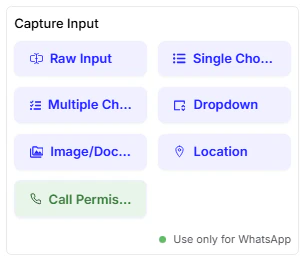
Within a Node, the **Capture Input** cards are used to collect information from the user in various formats. These are your primary tools for gathering data during a conversation.
 ***
#### **Raw Input**
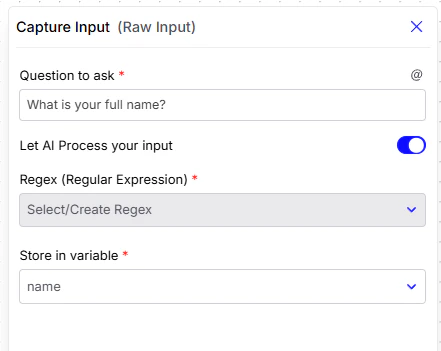
This card asks the user an open-ended question and captures their response as free-form text. It's ideal for questions that require a unique, typed answer, like a name or a detailed request.
* **Question to ask**: The message the user will see.
* **Let AI Process your input**: A toggle to let the AI analyze and understand the user's free text response.
* **Regex (Regular Expression)**: An advanced option to validate the user's input with a specific pattern (e.g., an email address format or a phone number).
* **Store in variable**: Saves the user's response in a variable for later use in the flow.
***
#### **Raw Input**
This card asks the user an open-ended question and captures their response as free-form text. It's ideal for questions that require a unique, typed answer, like a name or a detailed request.
* **Question to ask**: The message the user will see.
* **Let AI Process your input**: A toggle to let the AI analyze and understand the user's free text response.
* **Regex (Regular Expression)**: An advanced option to validate the user's input with a specific pattern (e.g., an email address format or a phone number).
* **Store in variable**: Saves the user's response in a variable for later use in the flow.
 ***
#### **Single Choice**
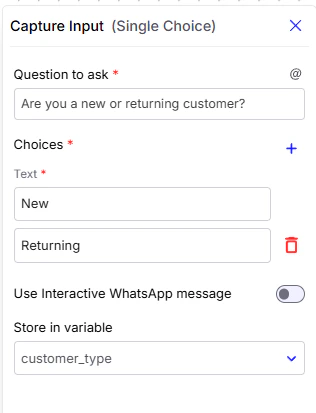
This card presents a set of options from which the user can select only one.
* **Question to ask**: The message the user will see.
* **Choices**: The list of options you want to present to the user.
* **Use Interactive WhatsApp message**: A toggle to format the choices as interactive buttons when the chatbot is integrated with WhatsApp.
* **Store in variable**: Saves the user's selection in a variable for later use in the flow.
***
#### **Single Choice**
This card presents a set of options from which the user can select only one.
* **Question to ask**: The message the user will see.
* **Choices**: The list of options you want to present to the user.
* **Use Interactive WhatsApp message**: A toggle to format the choices as interactive buttons when the chatbot is integrated with WhatsApp.
* **Store in variable**: Saves the user's selection in a variable for later use in the flow.
 ***
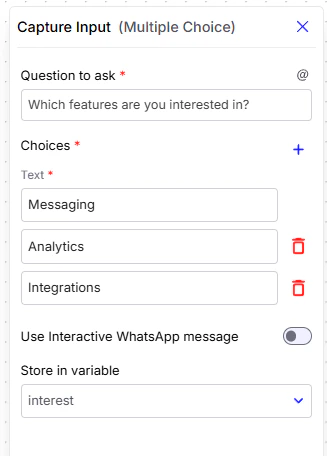
#### **Multiple Choice**
This card allows the user to select one or more options from a list.
* **Question to ask**: The message the user will see.
* **Choices**: The list of options you want to present.
* **Use Interactive WhatsApp message**: A toggle to format the choices as an interactive WhatsApp message.
* **Store in variable**: Saves the user's selections in a variable.
***
#### **Multiple Choice**
This card allows the user to select one or more options from a list.
* **Question to ask**: The message the user will see.
* **Choices**: The list of options you want to present.
* **Use Interactive WhatsApp message**: A toggle to format the choices as an interactive WhatsApp message.
* **Store in variable**: Saves the user's selections in a variable.
 ***
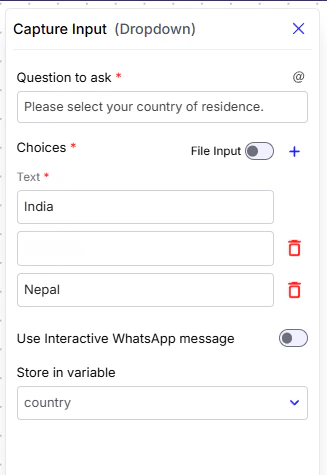
#### **Dropdown**
This card provides a compact menu for the user to select a single option from a list.
* **Question to ask**: The message the user will see.
* **Choices**: The list of options to be included in the dropdown menu.
* **File Input**: Use this option when you have **a large number of dropdown choices** that would be tedious to add manually. Instead of typing them one by one, you can upload a **CSV file** where the first column contains the list of options.
> **How it works:** Once you upload the CSV, each row in the first column is automatically converted into a dropdown option. The file must **not contain headers**. This allows you to quickly manage and update dropdowns without manual entry.
* **Use Interactive WhatsApp message**: A toggle to format the choices as an interactive WhatsApp message.
* **Store in variable**: Saves the user's selection in a variable.
***
#### **Dropdown**
This card provides a compact menu for the user to select a single option from a list.
* **Question to ask**: The message the user will see.
* **Choices**: The list of options to be included in the dropdown menu.
* **File Input**: Use this option when you have **a large number of dropdown choices** that would be tedious to add manually. Instead of typing them one by one, you can upload a **CSV file** where the first column contains the list of options.
> **How it works:** Once you upload the CSV, each row in the first column is automatically converted into a dropdown option. The file must **not contain headers**. This allows you to quickly manage and update dropdowns without manual entry.
* **Use Interactive WhatsApp message**: A toggle to format the choices as an interactive WhatsApp message.
* **Store in variable**: Saves the user's selection in a variable.
 ***
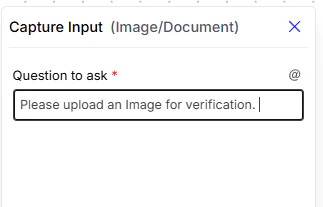
#### **Image/Document Upload**
This card enables the user to upload files, such as images or documents, directly into the conversation.
* **Question to ask**: The message the user will see.
***
#### **Image/Document Upload**
This card enables the user to upload files, such as images or documents, directly into the conversation.
* **Question to ask**: The message the user will see.
 ***
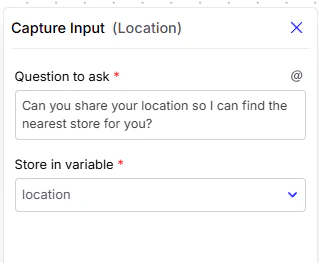
#### **Location**
This card prompts the user to share their geographical location.
* **Question to ask**: The message the user will see.
* **Store in variable**: Saves the user's location data in a variable.
***
#### **Location**
This card prompts the user to share their geographical location.
* **Question to ask**: The message the user will see.
* **Store in variable**: Saves the user's location data in a variable.
 #### **Call Permission Request**
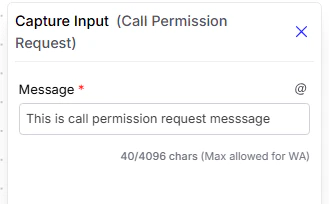
This card prompts the user to grant permission for voice calls. (**Note:** This is a WhatsApp-exclusive card).
* **Message:** The text displayed to the user immediately above the call permission request.
#### **Call Permission Request**
This card prompts the user to grant permission for voice calls. (**Note:** This is a WhatsApp-exclusive card).
* **Message:** The text displayed to the user immediately above the call permission request.