> ## Documentation Index
> Fetch the complete documentation index at: https://docs.chatzy.ai/llms.txt
> Use this file to discover all available pages before exploring further.
# Playground
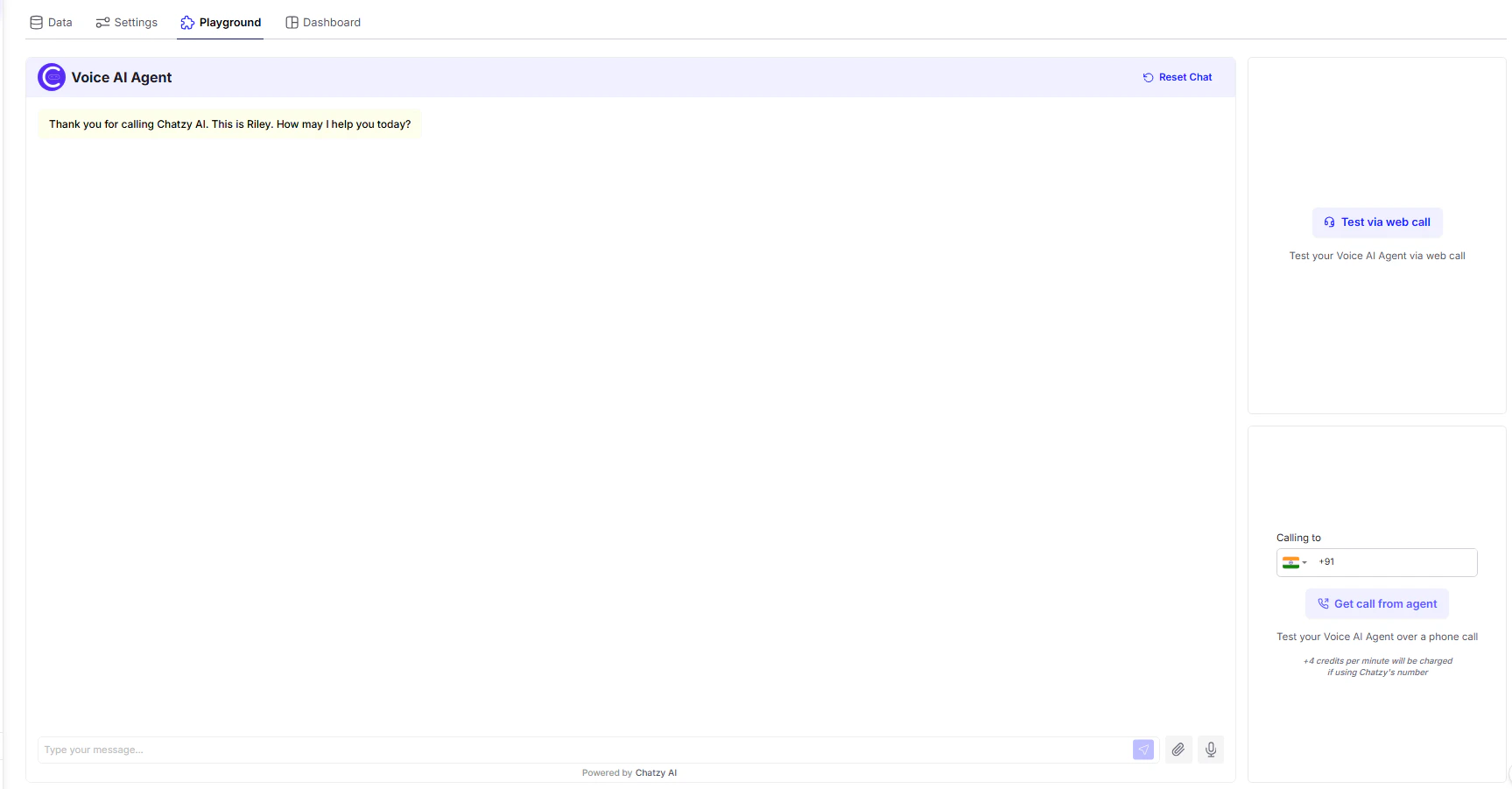
The **Playground** is your live testing environment for Voice AI Agents. It lets you simulate real user interactions — **by chat, browser call, or phone call** — so you can validate and refine your setup before going live.
 ***
### Three Ways to Test Your Voice AI Agent
#### 1. Simulate Chat (Text Mode)
* **How it works**: Use the message box to type user queries and see how the agent responds in real time.
* **Advantages**:
* Quick way to test logic and conversational flow.
* Works even if voice settings or telephony aren’t configured yet.
* **Best for**:
* Early testing of prompt, knowledge base, and decision logic.
* Validating fallback or error handling.
***
#### 2. Test via Web Call (Browser Mode)
* **How it works**: Click **Test via web call** to initiate a voice interaction right in your browser using your mic and speakers.
* **Advantages**:
* Zero setup — no phone number needed.
* Fastest way to test the full voice pipeline: STT → LLM → TTS.
* **Best for**:
* Tuning voice tone, pronunciation, pacing, and latency.
* Debugging voice interruptions (barge-in), silence detection, etc.
***
#### 3. Get Call from Agent (Phone Mode)
* **How it works**: Input your phone number and receive a real incoming call from your Voice Agent.
* **Advantages**:
* Full end-to-end telephony test, including call routing and quality over cellular networks.
* Best simulates how customers will interact in production.
* **Usage Note**:
* You’ll see a notice like:\
*“4 credits per minute will be charged if using Chatzy’s number.”*
* This makes it easy to estimate call testing cost.
***
### Conversation Panel
* **Transcript View**: Shows real-time logs of both user and agent messages (voice or text).
* **Reset Chat**: Clears the session so you can restart instantly.
* **Manual Input**: Type messages directly or speak via mic depending on the test mode.
***
> Use the Playground during each build phase to ensure smooth communication, correct logic, and responsive interaction before deploying your agent live.
***
### Three Ways to Test Your Voice AI Agent
#### 1. Simulate Chat (Text Mode)
* **How it works**: Use the message box to type user queries and see how the agent responds in real time.
* **Advantages**:
* Quick way to test logic and conversational flow.
* Works even if voice settings or telephony aren’t configured yet.
* **Best for**:
* Early testing of prompt, knowledge base, and decision logic.
* Validating fallback or error handling.
***
#### 2. Test via Web Call (Browser Mode)
* **How it works**: Click **Test via web call** to initiate a voice interaction right in your browser using your mic and speakers.
* **Advantages**:
* Zero setup — no phone number needed.
* Fastest way to test the full voice pipeline: STT → LLM → TTS.
* **Best for**:
* Tuning voice tone, pronunciation, pacing, and latency.
* Debugging voice interruptions (barge-in), silence detection, etc.
***
#### 3. Get Call from Agent (Phone Mode)
* **How it works**: Input your phone number and receive a real incoming call from your Voice Agent.
* **Advantages**:
* Full end-to-end telephony test, including call routing and quality over cellular networks.
* Best simulates how customers will interact in production.
* **Usage Note**:
* You’ll see a notice like:\
*“4 credits per minute will be charged if using Chatzy’s number.”*
* This makes it easy to estimate call testing cost.
***
### Conversation Panel
* **Transcript View**: Shows real-time logs of both user and agent messages (voice or text).
* **Reset Chat**: Clears the session so you can restart instantly.
* **Manual Input**: Type messages directly or speak via mic depending on the test mode.
***
> Use the Playground during each build phase to ensure smooth communication, correct logic, and responsive interaction before deploying your agent live.