> ## Documentation Index
> Fetch the complete documentation index at: https://docs.chatzy.ai/llms.txt
> Use this file to discover all available pages before exploring further.
# Initialize Conversation
Retrieves a `conversation_id` for the session and verifies the `chatbot_id` provided.
`chatbot_id` -> Get this from **Conversational AI Agents** > open your agent's menu (⋮ / hamburger) > **Copy Agent ID**.
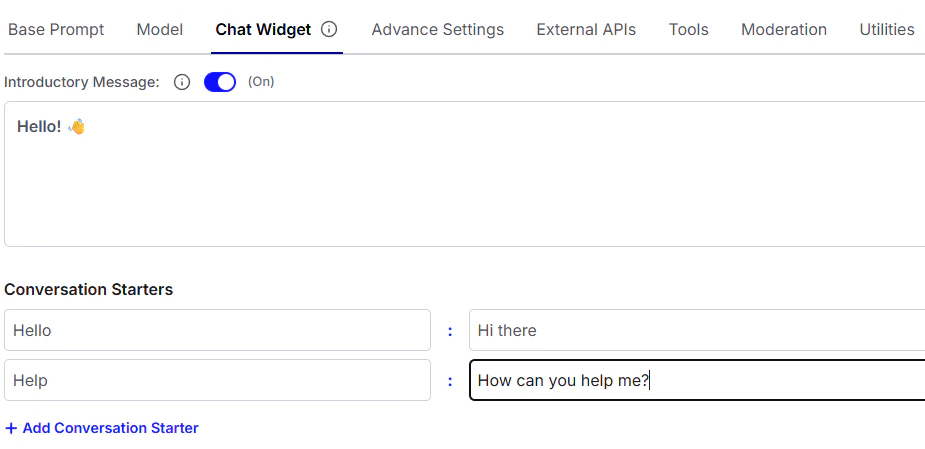
This also returns introductory message if the chatbot is configured to do so. You can configure introductory messages in the **Chat Widget** tab of the **AI Agent Settings** page.
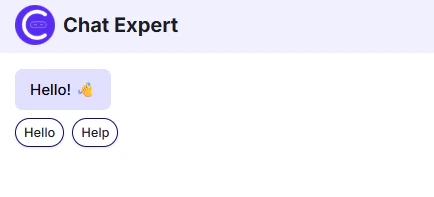
 This will be visible like this at the beginning of the conversation:
 ## OpenAPI
````yaml get /init_conversation
openapi: 3.0.0
info:
title: Chatzy AI API
version: 1.0.0
description: >-
Chatzy AI REST API for messaging, contact conversations, and agent
interactions.
contact:
name: Chatzy
url: https://chatzy.ai
email: support@chatzy.ai
servers:
- url: https://vevdoh3hve.execute-api.us-east-1.amazonaws.com/prod
description: Production Server
security: []
tags:
- name: Authentication
description: Authentication to access the API
- name: Contact Conversations
description: Get contact conversations
- name: Conversational AI Agent Interactions
description: Interact with the conversational AI agent
- name: Authorized iframe Access
description: APIs for authorized iframe access
paths:
/init_conversation:
get:
tags:
- Conversational AI Agent Interactions
summary: Initialize Conversation
parameters:
- name: chatbot_id
in: query
required: true
schema:
type: string
format: uuid
description: UUID of the chatbot to initiate conversation with.
responses:
'200':
description: Conversation initialized successfully.
content:
application/json:
schema:
type: object
properties:
data:
type: object
properties:
valid:
type: boolean
conversation_id:
type: string
format: uuid
introductory_message:
type: object
description: >-
Optional message shown at the beginning of the
conversation.
properties:
switch:
type: boolean
description: Flag to show or hide the message.
buttons:
type: array
description: >-
Optional list of buttons for conversation
starters.
items:
type: string
content:
type: string
description: Text content of the introductory message.
example: Hello! 👋
````
## OpenAPI
````yaml get /init_conversation
openapi: 3.0.0
info:
title: Chatzy AI API
version: 1.0.0
description: >-
Chatzy AI REST API for messaging, contact conversations, and agent
interactions.
contact:
name: Chatzy
url: https://chatzy.ai
email: support@chatzy.ai
servers:
- url: https://vevdoh3hve.execute-api.us-east-1.amazonaws.com/prod
description: Production Server
security: []
tags:
- name: Authentication
description: Authentication to access the API
- name: Contact Conversations
description: Get contact conversations
- name: Conversational AI Agent Interactions
description: Interact with the conversational AI agent
- name: Authorized iframe Access
description: APIs for authorized iframe access
paths:
/init_conversation:
get:
tags:
- Conversational AI Agent Interactions
summary: Initialize Conversation
parameters:
- name: chatbot_id
in: query
required: true
schema:
type: string
format: uuid
description: UUID of the chatbot to initiate conversation with.
responses:
'200':
description: Conversation initialized successfully.
content:
application/json:
schema:
type: object
properties:
data:
type: object
properties:
valid:
type: boolean
conversation_id:
type: string
format: uuid
introductory_message:
type: object
description: >-
Optional message shown at the beginning of the
conversation.
properties:
switch:
type: boolean
description: Flag to show or hide the message.
buttons:
type: array
description: >-
Optional list of buttons for conversation
starters.
items:
type: string
content:
type: string
description: Text content of the introductory message.
example: Hello! 👋
````