> ## Documentation Index
> Fetch the complete documentation index at: https://docs.chatzy.ai/llms.txt
> Use this file to discover all available pages before exploring further.
# Overview
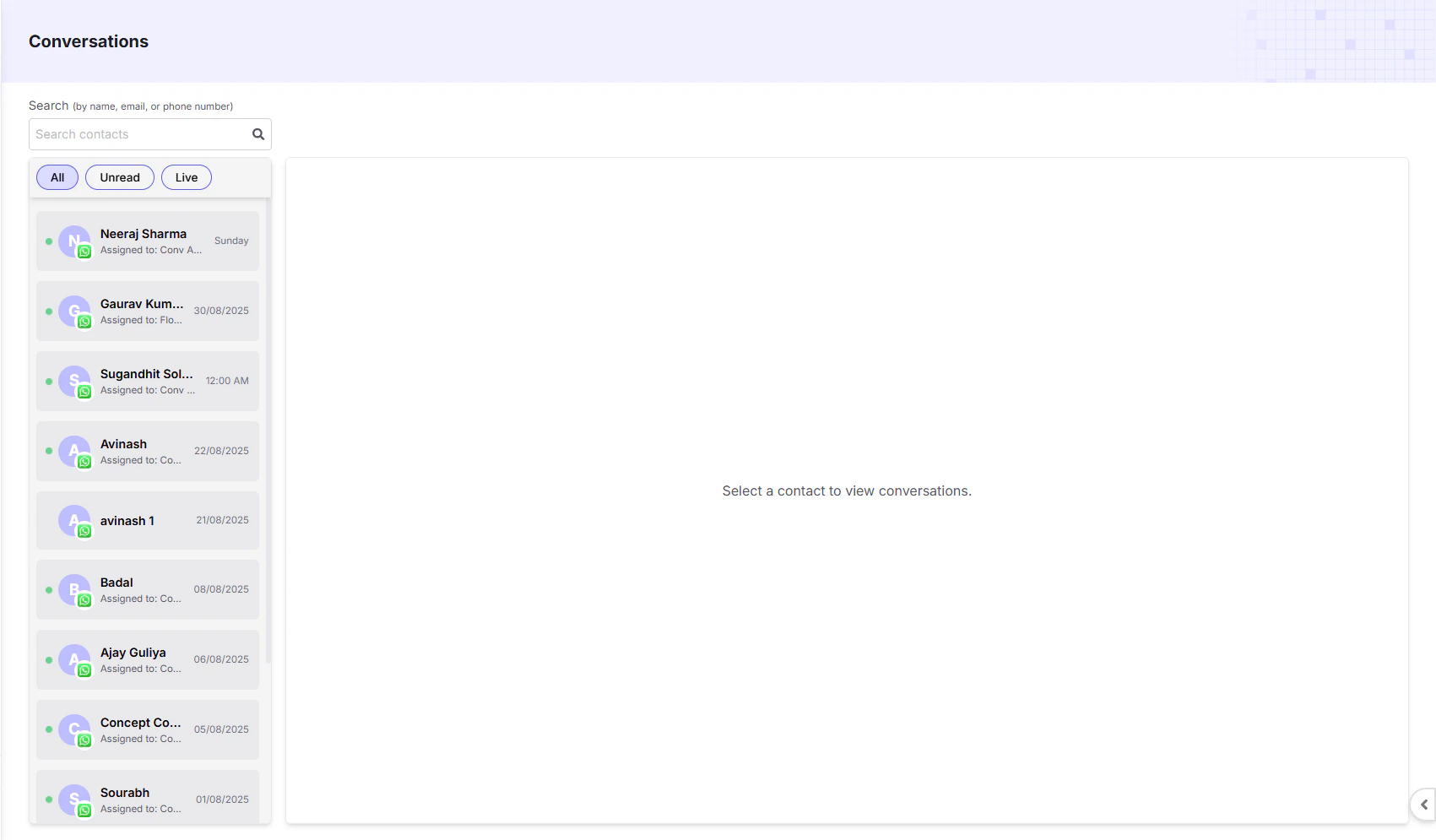
The **Conversations Dashboard** is your central inbox for managing all customer conversations across connected platforms such as **WhatsApp, Instagram, and Messenger**. It unifies communication by bringing together chats handled by **AI agents, automation flows, and human agents**.
 ***
#### Key Features
* **Search**: Quickly find a specific contact by their **name, email, or phone number**.
* **Filters**: Use the tabs at the top to filter your conversation list:
* **All**: Displays every conversation.
* **Unread**: Shows only new or unanswered conversations.
* **Live**: Displays conversations currently active or being handled by a **human agent or AI**.
* **Conversation List**: The left sideb ar shows a list of all conversations with the contact’s **name**, the **messaging channel icon** (WhatsApp, Instagram, Messenger), and the **date of the last message**.
* **Conversation View**: The main area shows the **full chat history**. Click a contact to see the entire conversation along with their **profile details**. Clicking the contact’s **name** opens a **contact card** on the far right displaying **basic details, tags, attributes, and creation date**.
* **Media Sharing**: You can **send images, PDFs, and other media**. If a user sends a media file, you can **download** it by clicking on it and selecting **Save**.
***
#### Indicators
* **Green Dot** = **Active or live conversation**, being handled by one of the following:
* **Conversational AI Agent** – natural language AI.
* **Flow-based AI Agent** – guided workflows.
* **Human Agent** – a team member.
* **Unread Chats**: Display a **blue tick** in the conversation list until opened.
* **Sorting**: Conversations are **always sorted by the latest activity** (most recent at the top).
***
#### Switching Roles and Handlers
* To pause AI or automation, **close the conversation**.
| Situation | What Happens |
| :-------------------------- | :------------------------------------------------- |
| Assigned to Human Agent | AI responses and campaigns are paused |
| Assigned to AI Agent / Flow | Human replies and campaigns are paused |
| Close Conversation | Resets the assignment and gives you direct control |
You can use the **Close Conversation** button **anytime** to change handlers or take manual control.
***
#### WhatsApp 24-Hour Rule
* If a contact has **messaged within the last 24 hours**, your business can freely send **messages and media**.
* After **24 hours of no incoming message**, **WhatsApp restricts outgoing messages**: you can **only send a pre-approved template message**.
* In this case, the **text box is disabled** and you will see an option to **Send Template**.
* Click **Send Template**, choose a template, and send it. Once sent, the conversation becomes **active again** and gets assigned to an **agent**, allowing you to close or reassign it if needed.
> **Note**: Instagram and Messenger have **no 24-hour restrictions**. You can message contacts at any time.
***
#### Campaigns & Automation Behavior
* When a conversation is **assigned to a human agent**, **AI bots and campaigns stop interacting** with that contact.
* When a conversation is **live with a Conversational AI or Flow AI**, campaigns will **skip sending template messages** to avoid conflicts.
***
#### Team Access
* Team members with the **Agent** role can:
* View the **Conversations** tab.
* Respond to messages directly.
* To assign this role:
* **Team Settings > Invite Members > Assign Role: Agent**.
***
***
#### Key Features
* **Search**: Quickly find a specific contact by their **name, email, or phone number**.
* **Filters**: Use the tabs at the top to filter your conversation list:
* **All**: Displays every conversation.
* **Unread**: Shows only new or unanswered conversations.
* **Live**: Displays conversations currently active or being handled by a **human agent or AI**.
* **Conversation List**: The left sideb ar shows a list of all conversations with the contact’s **name**, the **messaging channel icon** (WhatsApp, Instagram, Messenger), and the **date of the last message**.
* **Conversation View**: The main area shows the **full chat history**. Click a contact to see the entire conversation along with their **profile details**. Clicking the contact’s **name** opens a **contact card** on the far right displaying **basic details, tags, attributes, and creation date**.
* **Media Sharing**: You can **send images, PDFs, and other media**. If a user sends a media file, you can **download** it by clicking on it and selecting **Save**.
***
#### Indicators
* **Green Dot** = **Active or live conversation**, being handled by one of the following:
* **Conversational AI Agent** – natural language AI.
* **Flow-based AI Agent** – guided workflows.
* **Human Agent** – a team member.
* **Unread Chats**: Display a **blue tick** in the conversation list until opened.
* **Sorting**: Conversations are **always sorted by the latest activity** (most recent at the top).
***
#### Switching Roles and Handlers
* To pause AI or automation, **close the conversation**.
| Situation | What Happens |
| :-------------------------- | :------------------------------------------------- |
| Assigned to Human Agent | AI responses and campaigns are paused |
| Assigned to AI Agent / Flow | Human replies and campaigns are paused |
| Close Conversation | Resets the assignment and gives you direct control |
You can use the **Close Conversation** button **anytime** to change handlers or take manual control.
***
#### WhatsApp 24-Hour Rule
* If a contact has **messaged within the last 24 hours**, your business can freely send **messages and media**.
* After **24 hours of no incoming message**, **WhatsApp restricts outgoing messages**: you can **only send a pre-approved template message**.
* In this case, the **text box is disabled** and you will see an option to **Send Template**.
* Click **Send Template**, choose a template, and send it. Once sent, the conversation becomes **active again** and gets assigned to an **agent**, allowing you to close or reassign it if needed.
> **Note**: Instagram and Messenger have **no 24-hour restrictions**. You can message contacts at any time.
***
#### Campaigns & Automation Behavior
* When a conversation is **assigned to a human agent**, **AI bots and campaigns stop interacting** with that contact.
* When a conversation is **live with a Conversational AI or Flow AI**, campaigns will **skip sending template messages** to avoid conflicts.
***
#### Team Access
* Team members with the **Agent** role can:
* View the **Conversations** tab.
* Respond to messages directly.
* To assign this role:
* **Team Settings > Invite Members > Assign Role: Agent**.
***