> ## Documentation Index
> Fetch the complete documentation index at: https://docs.chatzy.ai/llms.txt
> Use this file to discover all available pages before exploring further.
# Overview
The **Dashboard** is your central hub for **analytics and performance monitoring**.\
It provides a high-level overview of your AI agents' activity while also allowing you to dive deeper into **detailed statistics** and trends.
 ***
#### Key Metrics
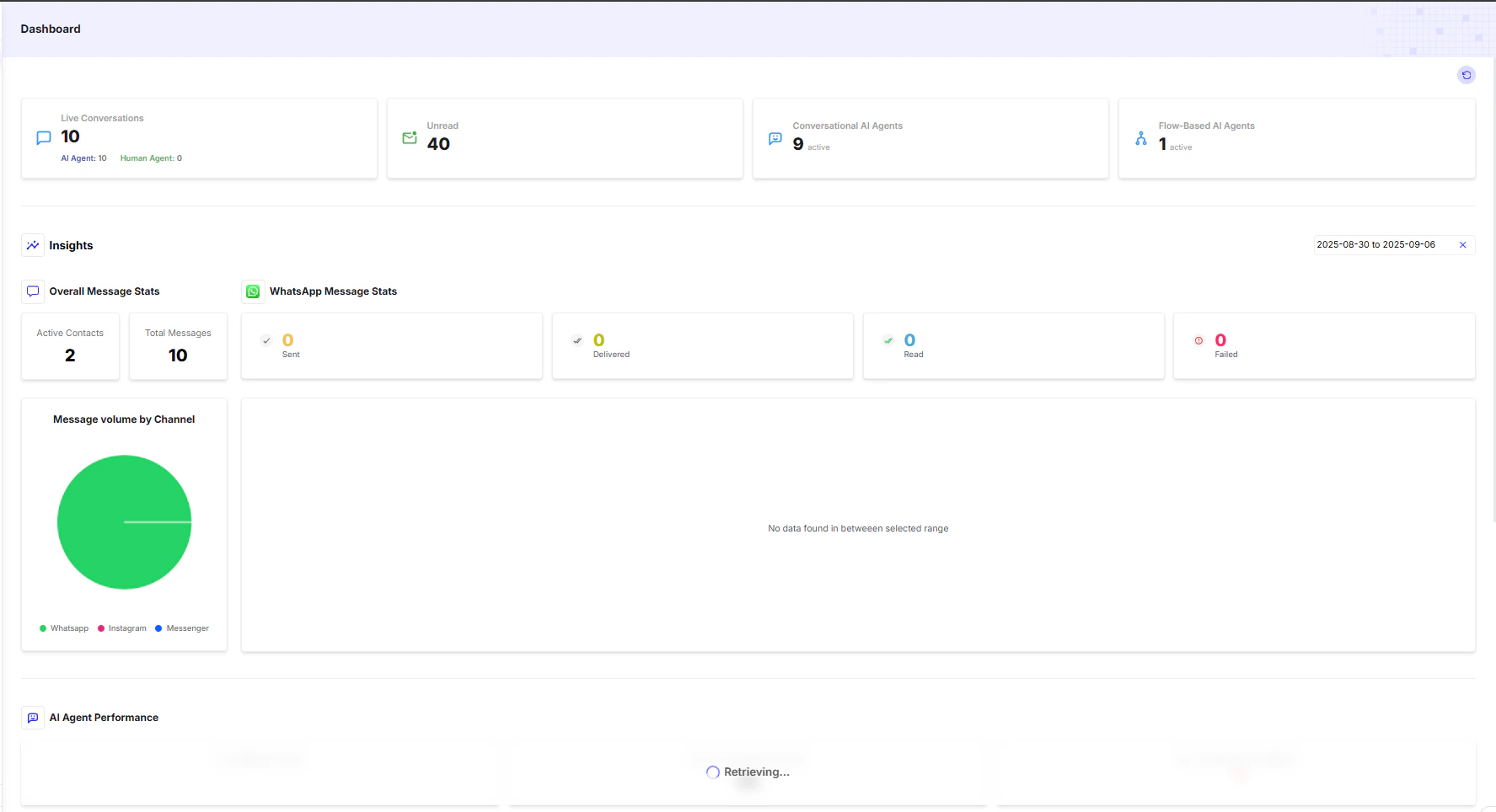
The **top section** of the dashboard gives you a quick snapshot of your agent's current performance:
* **Live Conversations** → Number of conversations that are currently active in real time.
* **Unread** → Total conversations that have not been opened or reviewed yet.
* **Conversational AI Agents** → Count of general-purpose AI agents live on your workspace.
* **Flow-Based AI Agents** → Count of journey-driven (structured flow) AI agents.
***
#### Key Metrics
The **top section** of the dashboard gives you a quick snapshot of your agent's current performance:
* **Live Conversations** → Number of conversations that are currently active in real time.
* **Unread** → Total conversations that have not been opened or reviewed yet.
* **Conversational AI Agents** → Count of general-purpose AI agents live on your workspace.
* **Flow-Based AI Agents** → Count of journey-driven (structured flow) AI agents.
 ***
#### Insights
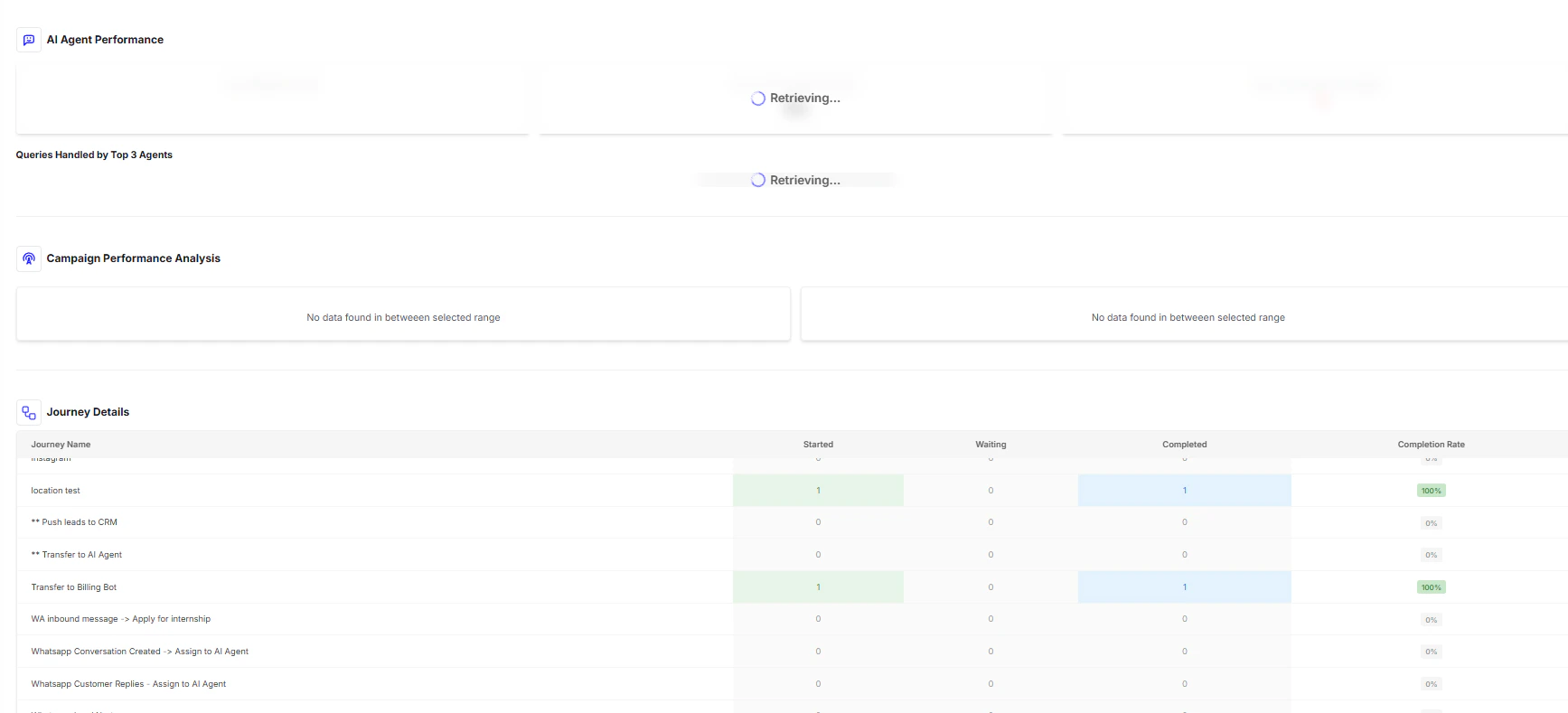
The **Insights section** provides deeper visibility into your chatbot’s message flow and performance metrics:
* **Overall Message Stats** → Tracks overall engagement with numbers like `Active Contacts` and `Total Messages`.
* **WhatsApp Message Stats** → Breaks down platform-specific messaging activity:
* **Sent** → Messages sent from the platform.
* **Delivered** → Messages successfully delivered to the recipient's device.
* **Read** → Messages opened/read by the recipient.
* **Failed** → Messages that were not delivered (e.g., due to network or platform issues).
* **Message Volume by Channel** → A graphical breakdown of message traffic across all connected channels (WhatsApp, Instagram, Messenger, etc.).
***
#### Performance & Details
At the **bottom of the dashboard**, you’ll find advanced analytics that help you monitor effectiveness at a granular level:
* **AI Agent Performance** → Individual analytics for each agent, showing which bots are most effective.
* **Campaign Performance Analysis** → Insights into outbound campaign effectiveness, message delivery, and user engagement.
* **Journey Details** → A detailed table tracking the lifecycle of each conversational journey:
* **Journey Name** → The title of the journey flow.
* **Started** → Number of times the journey was initiated.
* **Waiting** → Journeys currently paused at a "Wait" step.
* **Completed** → Journeys successfully finished.
* **Completion Rate** → % of journeys completed vs. started.
***
> 💡 **Tip:** Use the **Message Volume by Channel chart** to identify which platforms your users engage with most, then optimize campaigns and agent strategies accordingly.
***
#### Insights
The **Insights section** provides deeper visibility into your chatbot’s message flow and performance metrics:
* **Overall Message Stats** → Tracks overall engagement with numbers like `Active Contacts` and `Total Messages`.
* **WhatsApp Message Stats** → Breaks down platform-specific messaging activity:
* **Sent** → Messages sent from the platform.
* **Delivered** → Messages successfully delivered to the recipient's device.
* **Read** → Messages opened/read by the recipient.
* **Failed** → Messages that were not delivered (e.g., due to network or platform issues).
* **Message Volume by Channel** → A graphical breakdown of message traffic across all connected channels (WhatsApp, Instagram, Messenger, etc.).
***
#### Performance & Details
At the **bottom of the dashboard**, you’ll find advanced analytics that help you monitor effectiveness at a granular level:
* **AI Agent Performance** → Individual analytics for each agent, showing which bots are most effective.
* **Campaign Performance Analysis** → Insights into outbound campaign effectiveness, message delivery, and user engagement.
* **Journey Details** → A detailed table tracking the lifecycle of each conversational journey:
* **Journey Name** → The title of the journey flow.
* **Started** → Number of times the journey was initiated.
* **Waiting** → Journeys currently paused at a "Wait" step.
* **Completed** → Journeys successfully finished.
* **Completion Rate** → % of journeys completed vs. started.
***
> 💡 **Tip:** Use the **Message Volume by Channel chart** to identify which platforms your users engage with most, then optimize campaigns and agent strategies accordingly.