> ## Documentation Index
> Fetch the complete documentation index at: https://docs.chatzy.ai/llms.txt
> Use this file to discover all available pages before exploring further.
# Conversation Event
The **Conversion Event** action allows you to send **Meta Conversion Events** directly from your journey. These events help Meta measure conversions generated through your campaigns and optimize ad delivery based on customer actions.
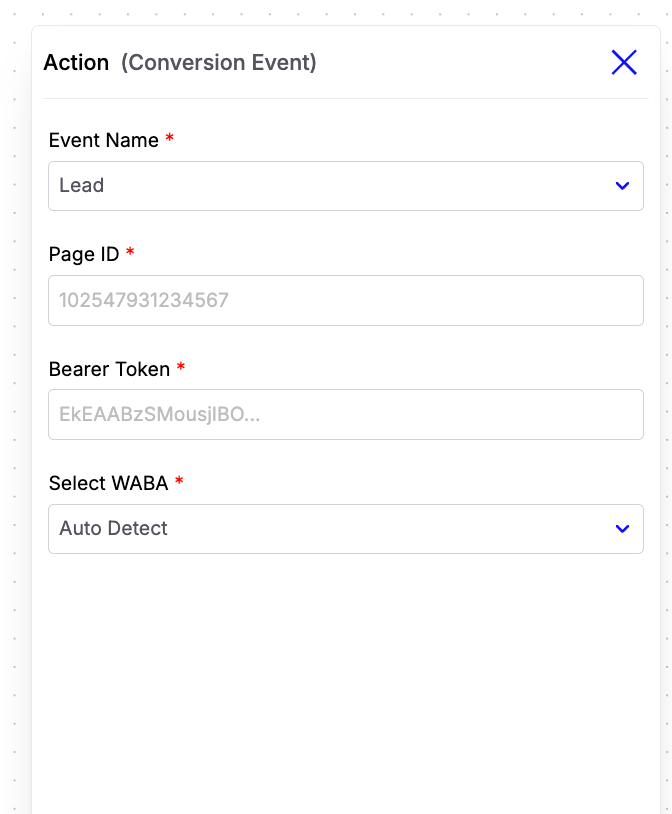 Currently, the following conversion events are supported:
* **Lead** – Trigger when a user becomes a qualified lead.
* **Purchase** – Trigger when a user successfully completes a purchase.
#### Configuration Fields
* **Event Name**\
Select the conversion event you want to send to Meta. Currently, the supported events are **Lead** and **Purchase**.
* **Page ID**\
Enter the Facebook Page ID associated with your Meta account.
* **Bearer Token**\
Enter your Meta access token with the required permissions to authenticate and send conversion events.
* **Select WABA**\
Select the **WhatsApp Business Account (WABA)** connected to Chatzy AI.
***
### Purchase Event Parameters
When the selected event is **Purchase**, you can optionally provide additional parameters to send more detailed conversion information to Meta.
Currently, the following conversion events are supported:
* **Lead** – Trigger when a user becomes a qualified lead.
* **Purchase** – Trigger when a user successfully completes a purchase.
#### Configuration Fields
* **Event Name**\
Select the conversion event you want to send to Meta. Currently, the supported events are **Lead** and **Purchase**.
* **Page ID**\
Enter the Facebook Page ID associated with your Meta account.
* **Bearer Token**\
Enter your Meta access token with the required permissions to authenticate and send conversion events.
* **Select WABA**\
Select the **WhatsApp Business Account (WABA)** connected to Chatzy AI.
***
### Purchase Event Parameters
When the selected event is **Purchase**, you can optionally provide additional parameters to send more detailed conversion information to Meta.
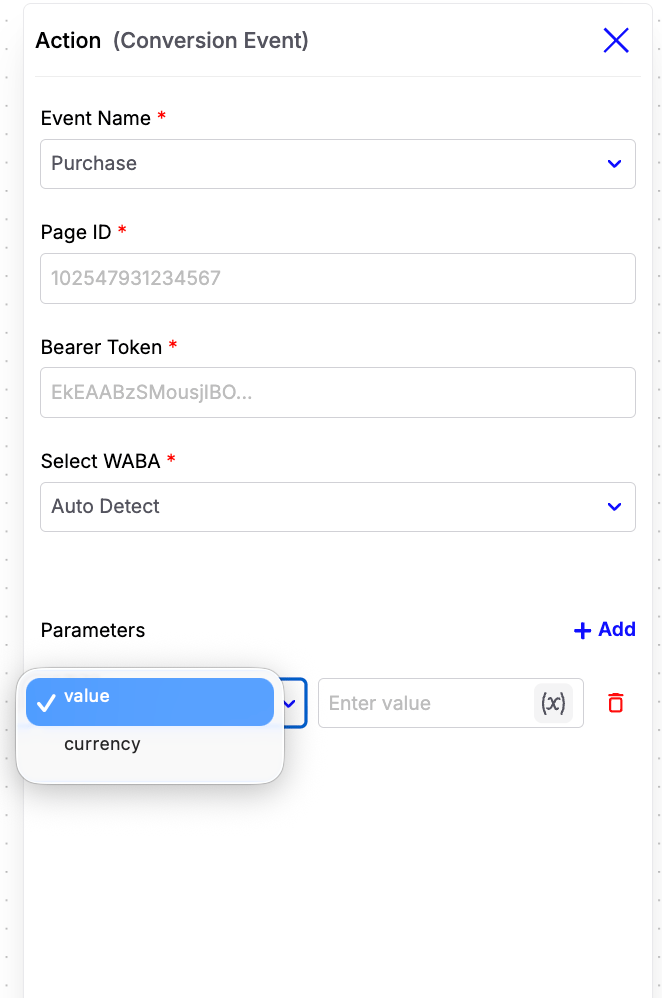 Supported parameters include:
* **currency**\
The ISO 4217 currency code associated with the purchase amount.
**Examples:**\
`INR`, `USD`, `EUR`
* **value**\
The total monetary value of the purchase. This can be a fixed value or a dynamic workflow variable.
> **Example:**\
> After a customer successfully completes a purchase, trigger the **Purchase** conversion event and provide the purchase **currency** and **value**. This helps Meta accurately attribute the conversion and optimize your advertising campaigns based on purchase data.
Supported parameters include:
* **currency**\
The ISO 4217 currency code associated with the purchase amount.
**Examples:**\
`INR`, `USD`, `EUR`
* **value**\
The total monetary value of the purchase. This can be a fixed value or a dynamic workflow variable.
> **Example:**\
> After a customer successfully completes a purchase, trigger the **Purchase** conversion event and provide the purchase **currency** and **value**. This helps Meta accurately attribute the conversion and optimize your advertising campaigns based on purchase data.