> ## Documentation Index
> Fetch the complete documentation index at: https://docs.chatzy.ai/llms.txt
> Use this file to discover all available pages before exploring further.
# Extract entities
The **Extract Entities** action is a powerful tool that automatically pulls specific, structured information from a user's past conversation history. It uses LLM (Large Language Model) capabilities to intelligently extract data - such as addresses, names, or dates - based on what the user has already said, and saves them into variables for later use. This allows for seamless automation of data capture without needing the user to re-enter information.
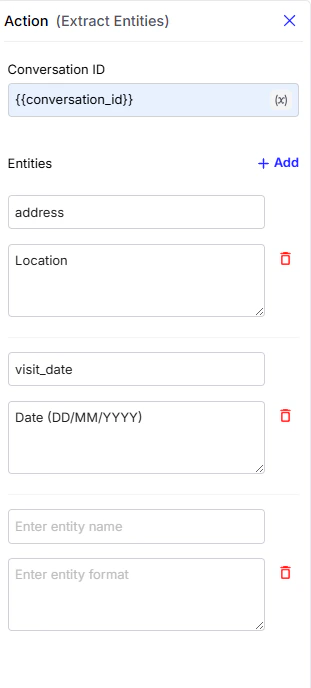 #### Configuration Fields
* **Conversation ID**: A unique identifier for the conversation from which data will be extracted. Using the `{{conversation_id}}` variable ensures that the current conversation's context is used.
* **Entities**: This is where you define what information you want to extract from the user's conversation.
* **Entity name**: The name of the Entity that you want to extract (e.g., `user_address`, `meeting_date`, `user_email`) this isn't a part work flow variables.
* **Entity format**: The expected format of the data to extract such as `"Date"`, `"Email"`, `"Phone Number"`, or a custom-defined type.
* **Storage**: Extracted entities are stored inside the journey’s workflow variables.\
The `workflow variables` is a dictionary, and within it, `extracted_entities` is another dictionary that holds all the extracted key–value pairs.
> 💡 **Example**: If the user previously said *"My address is in Delhi"* and you’ve configured `address` as an entity, the Extract Entities action will analyze the conversation history and automatically save **"Delhi"** into the `address` variable.
> you can use extract-entities later in your flow as we’ll
#### Configuration Fields
* **Conversation ID**: A unique identifier for the conversation from which data will be extracted. Using the `{{conversation_id}}` variable ensures that the current conversation's context is used.
* **Entities**: This is where you define what information you want to extract from the user's conversation.
* **Entity name**: The name of the Entity that you want to extract (e.g., `user_address`, `meeting_date`, `user_email`) this isn't a part work flow variables.
* **Entity format**: The expected format of the data to extract such as `"Date"`, `"Email"`, `"Phone Number"`, or a custom-defined type.
* **Storage**: Extracted entities are stored inside the journey’s workflow variables.\
The `workflow variables` is a dictionary, and within it, `extracted_entities` is another dictionary that holds all the extracted key–value pairs.
> 💡 **Example**: If the user previously said *"My address is in Delhi"* and you’ve configured `address` as an entity, the Extract Entities action will analyze the conversation history and automatically save **"Delhi"** into the `address` variable.
> you can use extract-entities later in your flow as we’ll
The Extracted entities are available in workflow variables and can be referenced using syntax.
e.g.
```python theme={null}
updated_address = variables["extracted_entities"]["address"]
```