> ## Documentation Index
> Fetch the complete documentation index at: https://docs.chatzy.ai/llms.txt
> Use this file to discover all available pages before exploring further.
# Transfer to AI Agent
The **Transfer to AI Agent** action hands off the current conversation to another AI agent. Unlike the **Assign to AI Agent** action, this is typically used to move a conversation to an agent with a specific skillset or a different knowledge base.
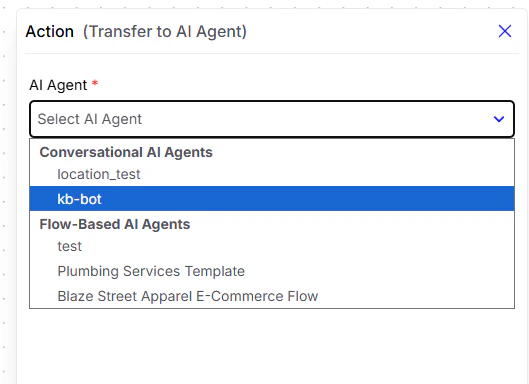 #### Configuration Field
* **AI Agent**\
Dropdown to select the agent that will permanently take over the conversation. Agents are categorized as:
* **Conversational AI Agents**: General-purpose bots for free-form conversation and information retrieval.
* **Flow-Based AI Agents**: Journey-based bots built in the Studio, designed to follow structured, predefined flows.
This guide explains how to set up transfer of conversation from one AI agent to another.
#### Configuration Field
* **AI Agent**\
Dropdown to select the agent that will permanently take over the conversation. Agents are categorized as:
* **Conversational AI Agents**: General-purpose bots for free-form conversation and information retrieval.
* **Flow-Based AI Agents**: Journey-based bots built in the Studio, designed to follow structured, predefined flows.
This guide explains how to set up transfer of conversation from one AI agent to another.