> ## Documentation Index
> Fetch the complete documentation index at: https://docs.chatzy.ai/llms.txt
> Use this file to discover all available pages before exploring further.
# Trigger Journey
The **Trigger Journey** action allows one journey to start another journey programmatically. This is useful for breaking large automations into smaller, reusable workflows or triggering specialized journeys based on conditions within your current journey.
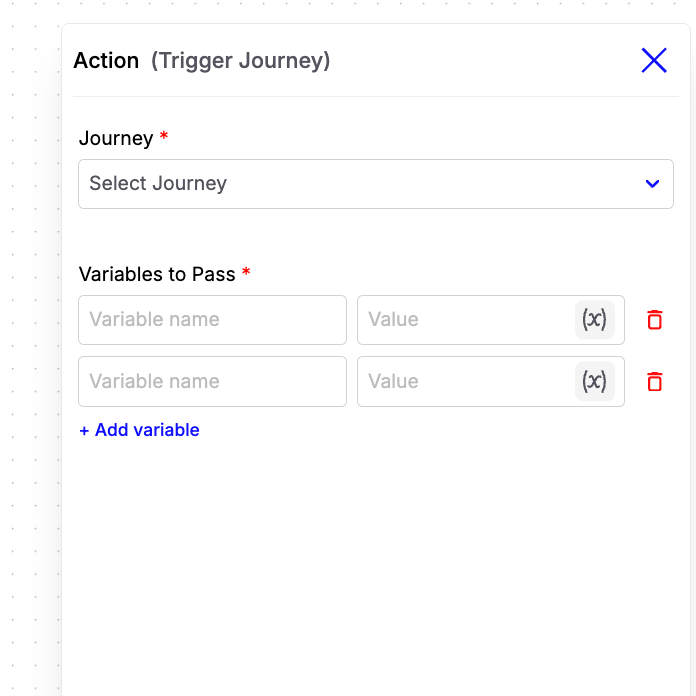 #### Configuration Fields
* **Journey**\
Select the journey that should be triggered when this action is executed.
* **Variables to Pass**\
Pass one or more variables from the current journey to the triggered journey. Each variable consists of:
* **Variable Name** – The key that will be available in the triggered journey.
* **Value** – The value to assign to the variable. This can be a fixed value or a dynamic workflow variable.
**Example:**
| Variable Name | Value |
| -------------- | -------------------------- |
| `phone_number` | `{{contact.phone_number}}` |
| `lead_status` | `Qualified` |
| `budget` | `{{budget}}` |
> **Note:** The triggered journey must use an **Inbound Webhook** trigger. All variables passed from this action will be available inside the triggered journey under the `inbound_webhook` object.
**Example:**
If you pass the following variables:
```json theme={null}
{
"phone_number": "9876543210",
"budget": "5000000"
}
```
You can access them in the triggered journey as:
* `{{inbound_webhook.phone_number}}`
* `{{inbound_webhook.budget}}`
***
### Example Use Case
Suppose you have a **Lead Qualification Journey** and a separate **Appointment Booking Journey**.
1. The Lead Qualification Journey collects the customer's details and determines that they are qualified.
2. Instead of handling appointment booking in the same journey, use the **Trigger Journey** action.
3. Pass variables such as the customer's phone number, name, and preferred location.
4. The Appointment Booking Journey starts automatically and continues the workflow using the received variables.
This approach keeps journeys modular, reusable, and easier to maintain.
#### Configuration Fields
* **Journey**\
Select the journey that should be triggered when this action is executed.
* **Variables to Pass**\
Pass one or more variables from the current journey to the triggered journey. Each variable consists of:
* **Variable Name** – The key that will be available in the triggered journey.
* **Value** – The value to assign to the variable. This can be a fixed value or a dynamic workflow variable.
**Example:**
| Variable Name | Value |
| -------------- | -------------------------- |
| `phone_number` | `{{contact.phone_number}}` |
| `lead_status` | `Qualified` |
| `budget` | `{{budget}}` |
> **Note:** The triggered journey must use an **Inbound Webhook** trigger. All variables passed from this action will be available inside the triggered journey under the `inbound_webhook` object.
**Example:**
If you pass the following variables:
```json theme={null}
{
"phone_number": "9876543210",
"budget": "5000000"
}
```
You can access them in the triggered journey as:
* `{{inbound_webhook.phone_number}}`
* `{{inbound_webhook.budget}}`
***
### Example Use Case
Suppose you have a **Lead Qualification Journey** and a separate **Appointment Booking Journey**.
1. The Lead Qualification Journey collects the customer's details and determines that they are qualified.
2. Instead of handling appointment booking in the same journey, use the **Trigger Journey** action.
3. Pass variables such as the customer's phone number, name, and preferred location.
4. The Appointment Booking Journey starts automatically and continues the workflow using the received variables.
This approach keeps journeys modular, reusable, and easier to maintain.