
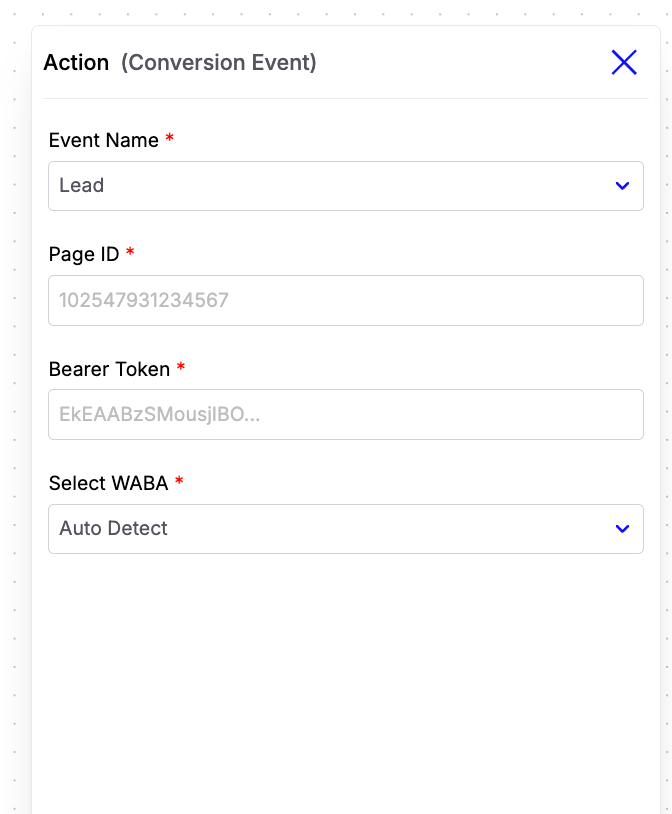
- Lead – Trigger when a user becomes a qualified lead.
- Purchase – Trigger when a user successfully completes a purchase.
Configuration Fields
-
Event Name
Select the conversion event you want to send to Meta. Currently, the supported events are Lead and Purchase. -
Page ID
Enter the Facebook Page ID associated with your Meta account. -
Bearer Token
Enter your Meta access token with the required permissions to authenticate and send conversion events. -
Select WABA
Select the WhatsApp Business Account (WABA) connected to Chatzy AI.
Purchase Event Parameters
When the selected event is Purchase, you can optionally provide additional parameters to send more detailed conversion information to Meta.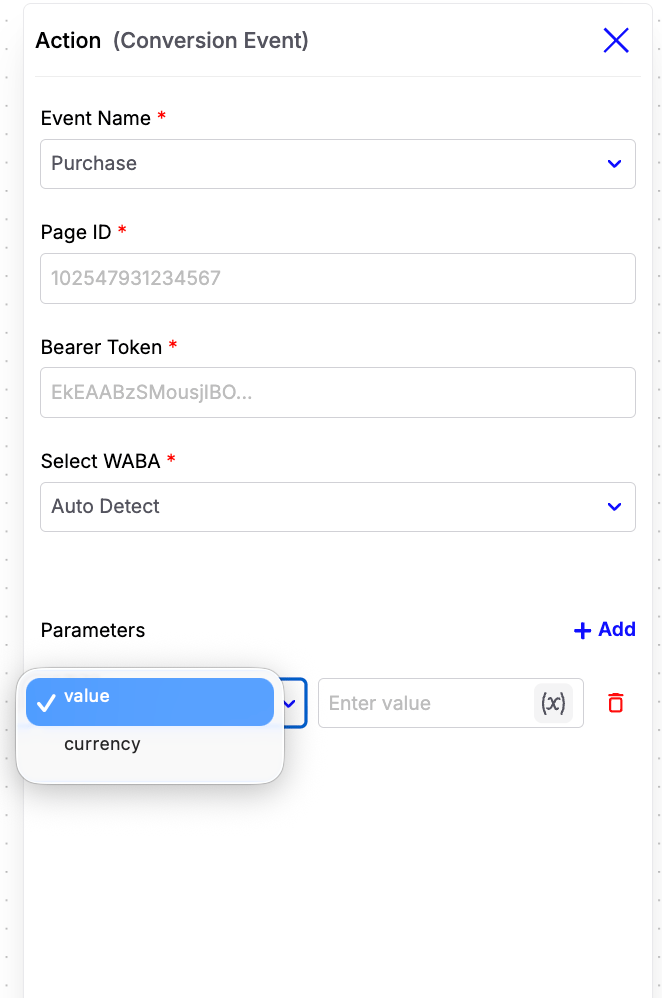
-
currency
The ISO 4217 currency code associated with the purchase amount. Examples:
INR,USD,EUR -
value
The total monetary value of the purchase. This can be a fixed value or a dynamic workflow variable.
Example:
After a customer successfully completes a purchase, trigger the Purchase conversion event and provide the purchase currency and value. This helps Meta accurately attribute the conversion and optimize your advertising campaigns based on purchase data.