
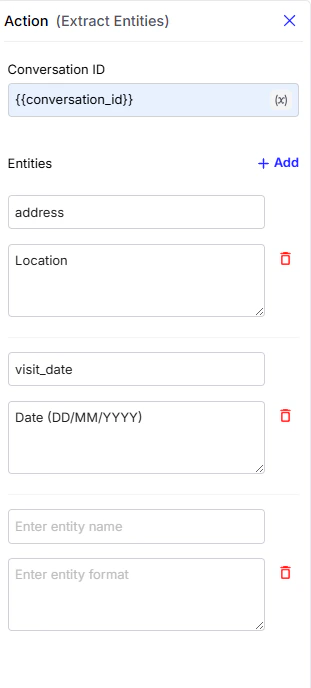
Configuration Fields
-
Conversation ID: A unique identifier for the conversation from which data will be extracted. Using the
{{conversation_id}}variable ensures that the current conversation’s context is used. -
Entities: This is where you define what information you want to extract from the user’s conversation.
- Entity name: The name of the Entity that you want to extract (e.g.,
user_address,meeting_date,user_email) this isn’t a part work flow variables. - Entity format: The expected format of the data to extract such as
"Date","Email","Phone Number", or a custom-defined type.
- Entity name: The name of the Entity that you want to extract (e.g.,
-
Storage: Extracted entities are stored inside the journey’s workflow variables.
Theworkflow variablesis a dictionary, and within it,extracted_entitiesis another dictionary that holds all the extracted key–value pairs.
💡 Example: If the user previously said “My address is in Delhi” and you’ve configuredaddressas an entity, the Extract Entities action will analyze the conversation history and automatically save “Delhi” into theaddressvariable.
you can use extract-entities later in your flow as we’llThe Extracted entities are available in workflow variables and can be referenced using syntax. e.g.